LIVE HR · 168 BPM · Z4

The WOD timer
that knows how hard
you're going.

Pair any Bluetooth chest strap. Pick EMOM, Intervals, AMRAP, or For Time. See your heart rate zone live, in numerals big enough to read across the gym, and get your splits when the block ends.

COMING TO THE APP STORE
REQUIRES iOS 17 · BLE HR SENSOR
THE APP · THREE MOMENTS
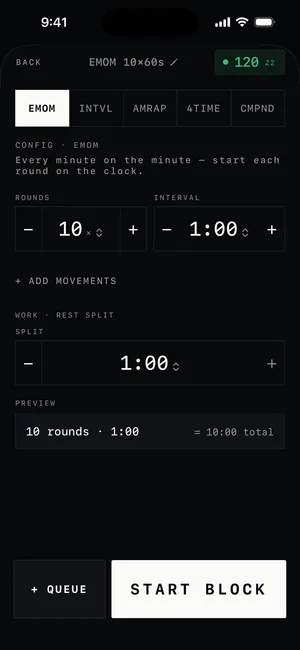
Block builder set to EMOM, 10 rounds of 1:00, with a Start Block button.
01 · BUILD
Pick a mode, set rounds and interval, start the block.
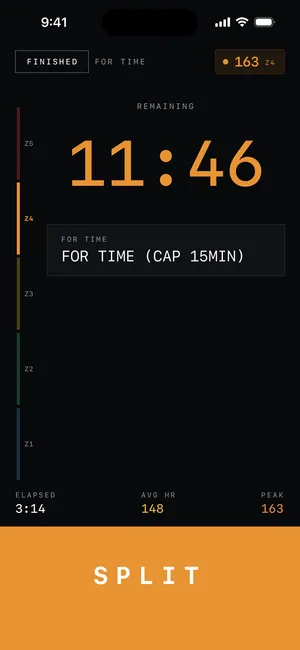
A For Time block running: 11:46 remaining in large orange numerals, heart rate 163 in zone 4, and a full-width Split button.
02 · IN THE WORK
The clock in your zone colour, big enough to read across the gym. The ladder on the left marks the live zone.
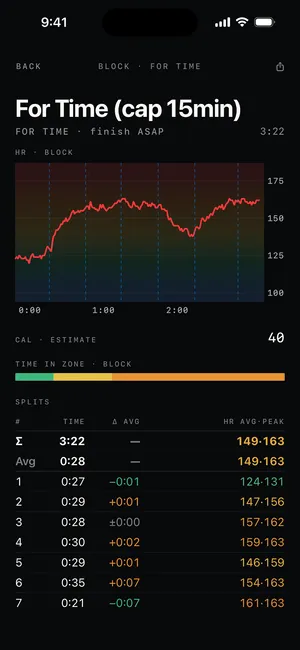
Block detail: heart-rate chart with split markers, time-in-zone bar, and a table of seven splits with time, delta from average and HR.
03 · THE SPLITS
The HR chart with a line at every split, time in zone, then each split's time, Δ from average, and average and peak HR.
HOW IT WORKS · FOUR STEPS

Strap on. Pick a block. Go.

01
Pair your chest strap.
Any Bluetooth heart-rate sensor that uses the standard Heart Rate service, chest strap or armband. Tested with the Polar Verity Sense, a Garmin chest strap and the Apple Watch.
02
Build the block.
Pick a mode (EMOM, Intervals, AMRAP, For Time), set rounds and intervals, type a name if you want one. Save templates for your go-to sessions.
03
Run it.
Tap START. Countdown, then the work. HR and time are the only things on screen, in numerals readable at 2 metres. Advance rounds with a full-bleed button. End with one tap.
04
Review what happened.
Average, peak and time-in-zone the moment you stop, with the splits table and Δ from avg underneath. Then the per-round HR trace and peak HR by round, so you can tap a segment, overlay the rounds and see the drift.
HR ZONES · 5 BUCKETS

A colour is faster to read than a number.

Mid-session you don't have time to do percent-of-max arithmetic. The zone ladder and the HR badge tell you where you are, in one glance, and the summary tells you how long you spent there.

Z1
< 60%
Recovery
Warmup · cooldown
Z2
60 – 70%
Endurance
Z2 aerobic base
Z3
70 – 80%
Tempo
Sustained pace
Z4
80 – 90%
Threshold
EMOM work phase
Z5
90 – 105%
VO₂ Max
AMRAP · sprints
FEATURES · ONE PURCHASE, $14.99

Everything below comes with the one purchase. The free timer is further down.

01
Five block types
EMOM, Intervals, AMRAP, For Time, and Compound. Compound chains several of them into one block that runs itself, with no tap between segments.
02
Work/rest splits
Scrub the work seconds anywhere from 0:05 to the whole round, in 5-second steps. Rest is whatever is left, so an EMOM gives you the breath you asked for. Below a 0:15 round the split switches off and the round runs as one work phase.
03
Live HR in zone colour
The badge changes colour the moment you cross a zone, so you never do the arithmetic.
04
Session summary
Average, peak, and a stacked time-in-zone bar across all five zones. Spot the "I coasted in Z3" problem.
05
Splits table with Δ
Each round shows duration and Δ from average. Green for under, orange for over, dim when a round lands on the average.
06
On-device only
HR samples and session logs stay on your phone. No accounts, no analytics.
07
Works offline
The strap pairs with the phone over Bluetooth, so a session needs no network.
08
HR round by round
Per-round average and peak beside each split, and one curve per round on a single chart so you can see the drift.
09
Share card
Duration, average and peak, time in zone and the HR chart as one image, on its own or over a photo from the session. A long session shows its first splits and a count of the rest.
FREE · THE TIMER

If a clock is all you want, that is free.

01
One block, four types
EMOM, Intervals, AMRAP or For Time. Full screen, same countdown, same cues. It runs the clock and nothing else. Compound is part of the purchase.
02
Live HR, discarded
Pair a strap and the zone colour and in-run AVG and PEAK work exactly as they do in a session. Nothing is written down when the block ends.
03
Free forever
No trial clock, no ads, nothing that expires. It sits beside NEW SESSION on the home screen rather than in front of it.
FAQ

Frequently asked questions.

Any Bluetooth Low Energy sensor that advertises the standard Heart Rate service (0x180D), and the Apple Watch through the Splits watch app. Tested with a Polar Verity Sense, a Garmin chest strap and the Apple Watch.
READY WHEN YOU ARE

Know what your heart did
in today's session.

COMING TO THE APP STORE